
What Should a Child Build by the End of Month 1 of Coding?
Most parents who book a free trial ask us the same question before they enroll. “This sounds good, but what will my child actually make?” It…
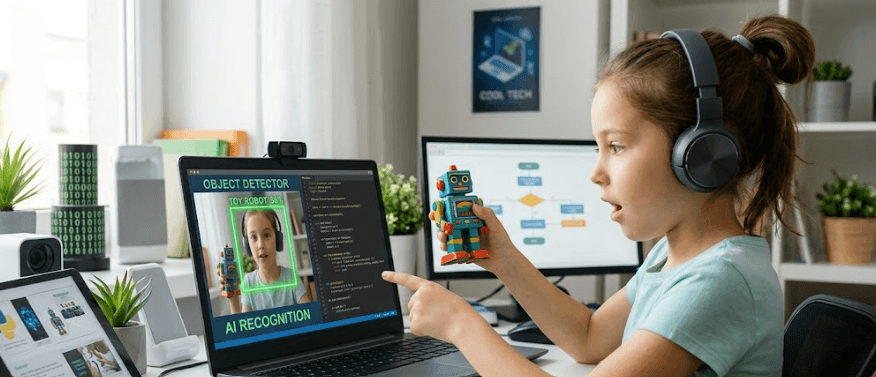
Most parents who book a free trial ask us the same question before they enroll.
“This sounds good, but what will my child actually make?”
It is the right question. And most coding platforms give a vague answer. Milestones. Levels. Progress badges. Nothing you can see, share, or point to and say: my child built that.
At ForSyntax, month 1 is six live sessions, one module, and one finished project your child owns completely. Not a template they filled in. Not a tutorial they followed step by step. Something they decided to build, shaped along the way, and can show anyone on a screen.
This post tells you exactly what that looks like, by age group, with real examples from real ForSyntax students. Including a 12-year-old named Shreyas who built an AI tool that identifies a shoe from a photo and estimates its resale price.
We will cover the structure of module 1, what the minor and major projects look like, what your child chooses vs what is guided, and what a realistic outcome is at different ages. No hype. No vague promises.
Why Projects First, Theory Later
Every ForSyntax session starts with a build, not a lecture.
This is deliberate. Children learn to code the same way they learn to ride a bike. You do not explain the physics of balance before putting a child on a bicycle. You put them on, hold the seat, and let them feel what working looks like. Theory arrives after experience, not before.
In month 1, your child will encounter concepts like loops, conditions, variables, and functions. But they will not encounter them as definitions. They will encounter them as problems their project needs solved. When a child building a quiz game realises the score is not going up correctly, they discover what a variable does by fixing their own broken thing. That sticks in a way that no explanation ever could.
This is what separates live 1:1 from recorded courses. A recorded video cannot notice that your child is confused and try a different explanation. A live teacher can. And does. Every session.
The Structure of Module 1
Module 1 runs across 6 live sessions. Each session is 50 to 60 minutes. The structure is not rigid because every child is different, but the shape is consistent.
Sessions 1 and 2 cover foundations through building. The child writes their first working code in session 1. Not a hello world message. Something visual, something that responds, something that already feels like the start of a real thing. By the end of session 2, they have completed the first minor project.
Sessions 3 and 4 introduce more complexity through the second and third minor projects. The child now makes decisions about what their project does. The teacher guides the logic. The child decides the content, the look, and the behaviour. These sessions are where most children have their first real moment of ownership, the moment they realise they are controlling what the computer does, not the other way around.
Sessions 5 and 6 are the major project sprint. Everything learned in sessions 1 through 4 is applied to something bigger. The child chooses the concept. The teacher helps architect it. The child builds it. By the final session, the project is complete, tested, and ready to share.
Module 1 produces a minimum of 5 projects. Three minor, two major. The minor projects are contained and achievable within a single session. The major projects span two sessions and require the child to hold a larger idea in mind across a week.
The Three Minor Projects
Minor projects are not throwaway exercises. They are the first things your child can genuinely show someone. Small, complete, working, theirs.
Minor Project 1: The Interactive Story or Animation
This is usually the first thing a child builds, regardless of age, because it requires the fewest moving parts while producing something immediately visible and shareable.
A younger child, seven to nine, typically builds a scene in Scratch where characters move, speak, and respond to mouse clicks. It might be a short animated story, a scene from a favourite show remade in code, or a simple choose-your-own-adventure with two or three outcomes. The project looks playful but underneath it contains sequencing, event handling, and basic control flow, all introduced without those words being used.
A child aged ten to twelve usually takes this further. The story becomes interactive rather than linear. A character responds differently based on what the user clicks. The animation loops. Sound is added. Some children at this age choose to skip the Scratch environment entirely after the first thirty minutes and move to Python with Pygame or a web-based tool, and the minor project becomes a simple text adventure game instead.
A child aged thirteen or fourteen often uses this first session to make something that already looks professional. A simple web page with HTML and CSS that animates on scroll, or a Python script that asks the user questions and responds based on their input. The interactivity is the point, and this group tends to test edge cases within the first session, trying to break their own creation to understand what it does and does not handle.
What makes it minor is scope, not ambition. It is complete in one session. It does what the child intended. It works.
Minor Project 2: The Game With Logic
By session 3, the child is ready to build something with rules.
A game has rules. Rules require conditions. Conditions are one of the most important concepts in all of programming. When a child builds a game that says if the player hits the wall, the game ends, they have written conditional logic in a context that makes complete sense to them. The concept arrives through necessity, not instruction.
For younger children, this is often a classic game rebuilt from scratch with their own twist. A maze where the character is someone from their favourite show. A catching game where the falling objects are things the child chose. A simple platformer where the character is a pet or a superhero.
For the ten to twelve age group, the game usually has a scoring system, a timer, and at least one level of increasing difficulty. These additions require variables for score tracking, loops for repeated events, and conditional checks for level transitions. The child does not learn these as a curriculum checklist. They learn them because their game does not work until they figure them out, and the teacher is there to show them the path when they are stuck, not to walk it for them.
For thirteen and fourteen year olds, the game often moves to Python or JavaScript. A command-line number guessing game with difficulty settings. A browser-based reaction time test. A text-based RPG with character stats. The sophistication of the logic increases, and this age group is often less interested in the visual output than in how clever the underlying rules are.
Minor Project 3: The Personalised Tool
The third minor project is the first time the child builds something genuinely useful rather than something that demonstrates concepts.
A calculator that does currency conversion. A quiz about a topic the child cares about, football statistics, Bollywood trivia, cricket records. A birthday countdown app. A simple to-do list. A random meal picker for a family that cannot agree on dinner.
The personalised tool is important because it shows the child that what they are learning is not just for class. It solves a real problem, however small, in their actual life. Parents consistently tell us this is the moment the child starts asking to have extra sessions or stays on after the call to keep building. The moment it clicks that they can make things that work in the world, not just in school.
For older children in this age group, the personalised tool often becomes more sophisticated than planned. A stock watchlist. A quiz app that remembers scores across sessions. A basic chatbot that answers questions about a topic the child chose. The teacher lets ambition lead and manages scope, keeping the project achievable within the session while encouraging the child to plan the larger version for the major project.
The Two Major Projects
Major projects are what module 1 is building toward. They take two sessions, span a week between them, and require the child to think about something across time, which is itself a skill.
Major Project 1: The Full Game or Interactive App
The first major project is an expanded version of everything from minor projects 1 and 2, but with the child fully in control of the vision.
At ForSyntax, the child chooses what they build. The teacher guides the architecture, helps debug, suggests solutions when the child is stuck, and keeps the scope realistic. But the idea, the story, the rules, and the experience all come from the child.
Common choices from ForSyntax students in this slot:
A platformer game with a character the child designed. Multiple levels, a lives system, increasing speed. Built in Scratch or Pygame depending on age.
A quiz app about a topic the child knows well. Questions they wrote themselves. A scoring system. A timer. A results screen that gives different feedback based on the score.
A story-based game where choices change the ending. Different branches, multiple outcomes, variables tracking what the player chose earlier.
A simple drawing application where the user can pick colours and brush sizes and save their work.
What makes it major is that it requires planning. Before session 5, the teacher and child spend the first ten minutes of session 5 sketching the project on a shared whiteboard, not a physical one, but a shared screen where the child describes what they want and the teacher maps out how to build it. This planning step is one of the most important things the child does in month 1 because it teaches them to think about a problem before touching the keyboard. Professional developers call this architecture. At ForSyntax, it is called figuring out what we are actually building before we start.
By the end of session 6 of the first arc, the major project 1 is complete. Working. Playable or usable. Theirs.
Major Project 2: The Showcase Project
The second major project is the one the child shows everyone.
At the end of module 1, every ForSyntax student has a showcase project. Not every showcase project is the same. Not every showcase project is equally complex. But every one of them is something the child is proud of, something they can explain, and something they could not have made six sessions ago.
For a seven year old, the showcase project might be an animated world they built in Scratch, complete with characters, dialogue, music, and interactive elements. It looks like a game but it is also a piece of creative expression. It took everything they learned across the module to make it work.
For a ten year old, it might be a fully functional quiz app with a leaderboard, timer, and categories the child designed. Or a simple mobile-style game with a score system and a difficulty curve.
For a thirteen or fourteen year old, this is where things get genuinely impressive.
Shreyas and the Air Jordan Price Detector
Shreyas is twelve years old. He has been obsessed with sneakers for as long as his parents can remember, specifically Air Jordans, their history, their colourways, their resale value, the difference between a 1985 original and a 2024 retro.
When ForSyntax gave Shreyas the showcase project brief, his teacher asked him one question: what is something you wish existed that does not?
Shreyas did not hesitate. He wanted a tool that could look at a photo of a sneaker and tell you what it was worth.
What he built in his showcase project across sessions 5 and 6 was an AI image recognition tool that takes a photo of a shoe, identifies whether it is a specific Air Jordan model, and returns an estimated resale price range based on the model detected. It uses a pre-trained image classification model, connected to a simple Python script Shreyas wrote himself, with a price lookup table he built manually from real StockX and GOAT data he researched himself.
It is not a polished product. The interface is basic. The price data is a snapshot from one week in 2025. It only recognises the four Jordan models Shreyas trained it to recognise. But it works. You can point a camera at an Air Jordan 1 Chicago colourway and it will tell you the shoe is likely worth between forty thousand and fifty five thousand rupees in the current resale market.
Shreyas built that in 6 sessions of coding. He was twelve.
His parents had told us before he enrolled that he was not a school person. That he found sitting still for traditional classes difficult. That they were not sure coding would hold his interest.
He has now completed three modules. He is building a full sneaker authentication tool that flags likely fakes based on stitching patterns in uploaded photos.
Shreyas is not an exception. He is an example of what happens when a child is allowed to build something they actually care about, with a teacher who meets them where their passion is, not where the curriculum says they should be.
What Younger Children Build
If your child is seven, eight, or nine, month 1 looks different from Shreyas’s experience, and it should.
At this age, Scratch is usually the right environment. Not because it is a limitation but because Scratch was designed by MIT specifically to give young children the full experience of building something real without the barrier of text syntax. Every concept in Scratch has an exact equivalent in Python, JavaScript, and every other professional coding language. A child who builds confidently in Scratch for six months transitions to Python in a weekend, because they already understand what they are trying to say. They just learn a new way to say it.
In month 1, a seven to nine year old ForSyntax student typically builds a minor project 1 that is an animated story or interactive scene, a minor project 2 that is a simple catching or dodging game, a minor project 3 that is a quiz about something they love, and a showcase major project that combines elements of all three into something larger.
One student built an interactive map of her neighbourhood in Scratch. You could click on her house and a character version of her would appear and tell you something about her life. You could click on her school and a scene from her day would play. It was creative, personal, and technically sound. She was eight.
Another student built a game where the player had to sort recycling correctly before the timer ran out. He had been learning about the environment at school and wanted to make something about it. He was nine.
The age does not determine the ambition. The child does.What the Ten to Twelve Age Group Builds
This is the age group where the projects most often surprise parents.
Ten to twelve year olds have enough abstract reasoning to plan ahead, enough patience to debug across a full session, and enough enthusiasm that a good idea can carry them through a frustrating hour of not understanding why something is not working.
At this age, the choice of tool in month 1 depends on what the child wants to build. If they want to make a game with visual characters, Scratch or Pygame. If they want to build a web tool, HTML, CSS and basic JavaScript. If they want to do something with data or AI, Python from the start.
Minor projects in this group tend to have more moving parts. Games have scoring systems. Tools have multiple features. Stories have branching logic. The child is not just putting blocks together; they are making decisions about what the code does and debugging when it does not do it.
The showcase projects from this age group that ForSyntax students have built include a weather app that shows data for any city and gives a sarcastic comment based on the temperature, a maths quiz that gets harder the more you get right and easier the more you get wrong, a name-based fortune teller that uses the letters in your name to generate a prediction, a simple inventory tracker for a child who collects trading cards, and a two player game that works on the same keyboard with different controls for each player.
These are not simple projects. They involve loops, conditions, functions, lists, and in some cases APIs. They were built in six sessions by ten to twelve year olds who had never coded before.
What Thirteen and Fourteen Year Olds Build
Teenagers in this age group often arrive at ForSyntax with one of two profiles. Either they have tried to learn from YouTube and gotten stuck because nobody helped them through the stuck parts. Or they are completely new to coding but highly motivated by a specific idea they want to build.
Both profiles do well. The first profile accelerates quickly because the live teacher fills in the gaps that YouTube left. The second profile often produces the most creative showcase projects because they have not yet been told what is and is not achievable.
Month 1 for this group is usually Python from session 1. Sometimes JavaScript if the child wants to build something for the browser. Occasionally both, if the project calls for it.
The minor projects are more complex than the younger age groups. A command-line tool that does something useful. A web scraper that pulls data from a public website and organises it. A simple API call that returns live data and formats it nicely.
The showcase projects are where this group genuinely impresses. A sentiment analysis tool that reads a paragraph of text and tells you if it sounds happy, sad, or angry. A budget tracker with categories and monthly summaries. A playlist generator that asks you five questions about your mood and suggests songs. A basic machine learning classifier that the child trained on data they collected themselves.
And yes, things like what Shreyas built. An AI image recognition tool. A price estimator. A fake detector.
These are not easy projects for a beginner. They require the teacher to move quickly, to trust the child with more complex tools than a standard month 1 curriculum would offer, and to scope the project carefully so it is achievable in two sessions while still being genuinely impressive. That is what live 1:1 makes possible. The curriculum bends to the child, not the other way around.
What Parents Notice After Month 1
We hear versions of the same things from parents after the showcase project session.
They stayed on for an extra hour after the session ended to keep building.
They showed their grandmother on a video call and explained how it worked.
They are already planning what they want to build in module 2.
They asked me if they can have an extra session this week.
The thing that shifts in month 1 is not just skill. It is identity. A child who has built five projects across six sessions, including one that works and that they designed, starts to think of themselves as someone who makes things. That shift in self-perception is worth more than any specific technical skill. It is the foundation everything else is built on.
FAQ
What if my child has never touched code before?
Month 1 is designed specifically for complete beginners. The teacher starts from zero and there is no assumption of prior knowledge. Session 1 produces working code regardless of starting point. We have enrolled children who had never used a computer independently before their first ForSyntax session. The live 1:1 format means the teacher adjusts pace, explanation style, and project choice entirely to the individual child. There is no class to keep up with.
What does ForSyntax use in month 1, what tools and languages?
It depends on the child’s age and interest. Younger children (7 to 9) typically start with Scratch. Children aged 10 and above often start directly with Python or move to it quickly. The tool follows the project. If a child wants to build something for the browser, we use HTML, CSS, and JavaScript. If they want to do something with data or AI, we use Python. The teacher recommends the right starting tool but the child’s project idea usually makes the choice obvious.
How many sessions are in month 1 and how long is each session?
Month 1 is one module of 6 sessions. Each session is 50 to 60 minutes. With a ForSyntax Alpha plan (1:1), sessions are scheduled based on the family’s availability and can be rescheduled freely. With a Beta plan (2 to 3 students), sessions run 2 to 3 times per week at agreed fixed times.
Will my child actually finish projects or just follow along?
This is the most important distinction between ForSyntax and most coding platforms. The child does not follow a tutorial. They build their own version of the project concept, choosing the content, the theme, and the behaviour. The teacher guides the structure and helps debug. The output is the child’s own creation, not a copy of a demo. If your child builds a quiz app in session 3, every question in that quiz is a question they wrote.
What if my child gets stuck and cannot finish the project in the session?
The teacher manages scope throughout the session to ensure the project is complete by the end. If a child’s ambition exceeds what is achievable in one session, the teacher helps them identify the core version that can be completed now and the expanded version to build next time. A complete, working smaller project is always better than an unfinished ambitious one. That said, most children’s projects complete on time because the teacher is actively managing the build throughout, not just watching.
My child is interested in AI and wants to build something like the Air Jordan price detector Shreyas built. Is that possible in month 1?
For a child aged 11 or above with strong motivation for that type of project, yes it is possible. It requires the teacher to move faster through foundational concepts and to introduce more advanced tools earlier than a standard module 1 would. This is one of the reasons live 1:1 matters. A group class cannot accelerate for one student without leaving others behind. A 1:1 session can run at exactly the pace the child’s ability and project require.
What is the difference between a minor and a major project?
Minor projects are contained within a single session and focus on one or two core concepts. They are complete and working by the end of the session. Major projects span two sessions and involve more planning, more concepts, and a larger idea. The showcase project, the second major project of module 1, is the one the child presents to family and friends as their own creation from month 1.
Does the child keep their projects after the session?
Yes. Every project is saved to the child’s account on the platform they use (Scratch, Replit, VS Code with GitHub, etc.) and accessible indefinitely. Parents can view and share the projects. The child owns everything they build.
My child is 14 and worried coding will be too basic or boring at the start. What would you say to them?
Show them Shreyas’s project. Then book a free trial and let the first session answer the question better than we can.
How do we book a free trial session?
One button, one form. Book a free ForSyntax live session and your child builds something real in the first 60 minutes.
Book a Free Trial
Your child can build something in their first session. Not follow along. Not watch a demo. Build something real, something they chose, something that works.
Book a free ForSyntax Alpha session. Six sessions later, ask them to show you what they made.
